Showing posts with label media. Show all posts
Showing posts with label media. Show all posts
Friday, April 28, 2017
Windows Media Center Personal Video Recorder PVR How To
Windows Media Center Personal Video Recorder PVR How To
Windows Media Center PVR How To
So I decide to do some research and see why this is. Well, money plain and simple. The provider companies provide this equipment for a fee because they know they can get it. Most people just go with the flow and know this process as the price of doing business. Well I take it because your reading this that you are not an individual that likes to do this because youre looking for alternatives. Hence the reason the FCC made it mandatory for providers to allow third party intervention. See http://en.wikipedia.org/wiki/CableCARD for additional information.
I will now attempt to go into detail on how to set this up and provide links to areas of information throughout this how to that have already been established.
Required:
- CableCARD or MCard tuner from your provider. My provider was Verizon FIOS and I ordered the MCard from their website and waited the week for it to arrive at my house. You only need one per CableCARD device. Other cable companies also provide this MCard. Cox and Comcast.
- CableCARD tuner. I purchased a Ceton InfiniTV PCIe device for my computer through newegg.com for about $199 (they should be on sale now as the PCIe 6 device [$299] just came out). The PCIe 4 device was fine for me in recording 4 separate channels at one time. You can use the USB device as I tried but had issues and switched to the PCIe device.
- Personal Computer (PC) with the minimum requirements as stated by Ceton. I also added a 2TB hard drive for recording space.
- Windows 7 or 8 operating system (OS) with Media Center (MC). I purchased Win7 OS and upgraded to Win8 and got the free upgrade to MC before 30 Jan 2013 cut off. If you do not already have MC then purchase through Microsoft. Believe its still $60.
- HD TV service from your service provider.
- To provide service to other rooms throughout the house you will need a Windows Media Center Extender (WMCE). If you already have an XBOX360 you have a WMCE. If you need to purchase one Ceton makes one that is cheaper than buying a new XBOX360 called the Echo. You could also purchase used XBOX360s from GameStop, Newegg.com, etc. Think of this device as your new set-top box. Youll own it and wont pay rent on it.
- A router and this is were it gets iffy. The industry tots that a WiFi "N" router can handle media streaming. This might be the case in testing but in my experience hasnt panned out for me. I had to go to an all wired architecture. By all wired I also mean power line networks. I have my main 60" LCD LED mounted over my fireplace with no access to a hard wired CAT 5/6 cable. I do however have access to a home power plug. I plugged the network homeplug (network power line) into the power outlet and the other end of the power line adapter close to my router and finished network connectivity. I purchased the Belkin AV500 and it works great. They do have a new Powerline Gigabit HD version out now and for a little extra doe might be worth it. Refer to the owners manual for proper setup. Recommend not using surge / multi-plugs power strips as they do not work well with these devices. Youll know because the bandwidth speed is crap. Also ensure the two plugs you decide to connect are on the same circuit. Security reasons, I would recommend encryption because even the plugs on the outside of your house could be used to tap into the network. Everywhere else I ran hard line CAT 5/6 cable linking to other WMCEs.
- You might require a swtich if you run out of CAT5/6 plugs on your router from overcrowding. I went gigabit 10/100/1000. Not necessary as 10/100 switches will have more than plenty of bandwidth to stream. I wanted to ability to transfer file from one computer to another with greater speed is why I went gigabit.
Once you have the above items your ready to setup.
-Connect your Ceton InfiniTV Tuner to your computer. See the installation instructions.
-Install the CableCARD to the Ceton InfiniTV Tuner.
-Turn on your computer.
-Download the Ceton software. Downloading ensure you have the latest and greatest drivers and software.
-Ensure the device is working properly. Start the Ceton Diagnostics.

-The device should be recognized.

-Follow the detailed installation instructions to get the tuners up and running. This will require you to contact your service provider and advise them of your CableCARD serial number found under the diagnostics. You more than likely will not have green check marks if the CableCARD has not been activated. The service provider must send the correct signal to the CableCARD to ensure the encrypted signals are decrypted by the card. Do not hang up with your service provider until you see the green check marks. They will dynamically update so keep watching.

-The WMC should download the program guide and your ready to watch TV and record.
Ceton also has an Android app and iPhone app to control your WMC remotely also. Be advise that it wont let you watch the shows from that device only manage.
Now to extend your WMC to another device like an XBOX360 to Ceton Echo follow these instructions. The devices have to be connected to your network.
Now play with your new WMC PVR for a while to make sure things are working before returning your set-top boxes.
After becoming familiar with you WMC you might later get into converting your recorded show. Programs like MCE Buddy and MC-TV Converter automatically convert the proprietary WMC codec format to .avi or .mp4 and remove commercials.
Even further you could be interested in serving out your record TV to your mobile devices like phone or tablet. You would likely use Remote Potato to stream your converted TV without commercials to these devices from your WMC computer. The phone or tablet would used the Remote Media Center program to link to that server.
Happy Recording...
Available link for download

Monday, April 24, 2017
Universal Media Server CRACK 6 3 1 1 Free Download
Universal Media Server CRACK 6 3 1 1 Free Download

Universal Media Server 6.3.1.1 | 78/78 MB
Universal Media Server is a DLNA-compliant UPnP Media Server. UMS was started by SubJunk, an official developer of PMS, in order to ensure greater stability and file-compatibility. The program streams or transcodes many different media formats with little or no configuration. It is powered by MEncoder, FFmpeg, tsMuxeR, AviSynth, MediaInfo and more, which combine to offer support for a wide range of media formats. Because it is written in Java, Universal Media Server supports all major operating systems, with versions for Windows, Linux and Mac OS X.
Features:
Works with PS3, Xbox, TVs, Smart phones and many other devices
Written in Java for use on Windows, Linux or Mac OS X
Whats New :
General:
Fixed connectivity issues
Download Links for Java 7:
DownloadFrom Rapidgator.net
Download From Nitroflare.com
Download FromHomepage
Download From Nitroflare.com
Download FromHomepage
Download Links for Java 8:
DownloadFrom Rapidgator.net
Download From Nitroflare.com
Download FromHomepage
Download From Nitroflare.com
Download FromHomepage
Available link for download
Wednesday, April 12, 2017
TELECHARGER VLC MEDIA PLAYER V 1 1 11 by Parvin
TELECHARGER VLC MEDIA PLAYER V 1 1 11 by Parvin
| Name: | Vlc Media Player V 1.1.11 |
| File size: | 28 MB |
| Date added: | January 26, 2013 |
| Price: | Free |
| Operating system: | Windows XP/Vista/7/8 |
| Total downloads: | 1471 |
| Downloads last week: | 86 |
| Product ranking: | ★★★★★ |
 | |
I think its very good. Id be unhappy, but I wouldnt kill myself. This job is killing me. He named his son Robert after his own father. I had a hard time. He had barely enough to eat. Take as many cookies as you want. When I went to the store, they didnt have any apples. I can take you. Can I buy a ticket for the concert here?
Vlc Media Player V 1.1.11: - Ann came downstairs.
- They insisted on my getting the work done by tomorrow.
- He may come and see us tonight.
- My eyes are sore.
- I think its time for me to apologize to her.
- I have many coins in this box.
- I remember.
- How do I find the webpage? I tried to search for it on Yahoo but I couldnt find it.
- Please write down what he says.
- TELECHARGER VLC MEDIA PLAYER V 1.1.11
- Can you pass me the salt, please?
Did you get there on time? I felt that I should help her. I hate jealous women. He catches colds very easily. Id like to kiss you. Ill be at home the next time she comes. I think its highly unlikely that well ever get any help from the national government. I think its time for me to wash this shirt. She got engaged to him. She wanted him to help her father.
Vlc Media Player V 1.1.11 charts
Vlc Media Player V 1.1.11 location
Vlc Media Player V 1.1.11 google search
Vlc Media Player V 1.1.11 ask google support
Vlc Media Player V 1.1.11 chrome extensions
Vlc Media Player V 1.1.11 for android
Vlc Media Player V 1.1.11 videos
Vlc Media Player V 1.1.11 twitter search
Vlc Media Player V 1.1.11 wiki
Vlc Media Player V 1.1.11 photos
Vlc Media Player V 1.1.11 world
Vlc Media Player V 1.1.11 youtube videos
Vlc Media Player V 1.1.11 bing photo search
Vlc Media Player V 1.1.11, Inc. 40682 New Orleans Street, Louisiana 4009 - USA, CA 70178 Tel: 622-728-2030 - Fax 630-963-8726 E-mail:Sharon_Parvin@gmail.com
Vlc Media Player V 1.1.11 address

Vlc Media Player V 1.1.11 world
Available link for download
Monday, February 27, 2017
VLC Media Player Terbaru 2 2 1 Offline Installer
VLC Media Player Terbaru 2 2 1 Offline Installer
VLC Media Player Terbaru Offline Installer merupakan salah satu software pemutar media terbaik ditahun ini, dan tidak kalah dengan PotPlayer ataupun Media Player Classic, salah satu kelebihan VLC Media Player yaitu kelengkapan codec yang dimilikinya, selain itu software ini juga freeware dan Open Source.
Wikipedia: https://id.wikipedia.org/wiki/VLC
:: Features VLC Media Player ::
- Simple, fast and powerful media player.
- Plays everything: Files, Discs, Webcams, Devices and Streams.
- Plays most codecs with no codec packs needed:
- MPEG-2, DivX, H.264, MKV, WebM, WMV, MP3...
- Runs on all platforms: Windows, Linux, Mac OS X, Unix...
- Completely Free, no spyware, no ads and no user tracking.
- Can do media conversion and streaming.
- Read more: http://www.videolan.org/vlc/features.html
:: Download Link ::
Free Download VLC Media Player Terbaru Gratis
:: 32bit/x86 - 27MB ::
- Server 1
- Server 2
- Server 3
- Server 4
- Server 5
:: 64bit/x64 - 28MB ::
- Server 1
- Server 2
- Server 3
- Server 4
- Server 5
Official Website VLC Media Player: http://www.videolan.org/vlc/
Available link for download
Sunday, January 29, 2017
VLC Media Player v2 1 5 Full Latest
VLC Media Player v2 1 5 Full Latest
Description:-
VLC Media Player is the most popular and robust multi format, free media player available. The open source media player was publically released in 2001 by non-profit organization VideoLAN Project. VLC Media Player quickly became very popular thanks to its versatile multi-format playback capabilities. It was aided by compatibility and codec issues which rendered competitor media players like QuickTime, Windows and Real Media Player useless to many popular video and music file formats. The easy, basic UI and huge array of customization options have enforced VLC Media Player?s position at the top of the free media players.
Flexibility:-
VLC plays almost any video or music file format you can find. At its launch this was a revolution compared to the default media players most people were using that often crashed or displayed ?codecs missing? error messages when trying to play media files. VLC can play MPEG, AVI, RMBV, FLV, QuickTime, WMV, MP4 and a shed load of other media file formats. For a full list of compatible file formats please click here. Not only can VLC Media Player handle loads of different formats, VLC can also playback partial or incomplete media files so you can preview downloads before they finish.
Easy to Use:-
VLC?s UI is definitely a case of function over beauty. The basic look does however make the player extremely easy to use. Simply drag and drop files to play or open them using files and folders then use the classic media navigation buttons to play, pause, stop, skip, edit playback speed, change the volume, brightness, etc. A huge variety of skins and customization options mean the standard appearance shouldn?t be enough to prevent you choosing VLC as your default media player.
Advanced Options:-
Don?t let VLC Media Player?s simple interface fool you, within the playback, audio, video, tools and view tabs are a huge variety of player options. You can play with synchronization settings including a graphic equalizer with multiple pre-sets, overlays, special effects, AtmoLight video effects, audio spatializer and customizable range compression settings. You can even add subtitles to videos by adding the SRT file to the video?s folder.
Summary:-
VLC Media Player is quite simply the most versatile, stable and high quality free media player available. It has rightly dominated the free media player market for over 10 years now and looks like it may for another 10 years thanks to the constant development and improvement by VideoLAN Org.
Requirements:-
Windows XP / Windows 7/ Windows 8 / Windows 8.1 or above With Minimum Requirements
Previews:-
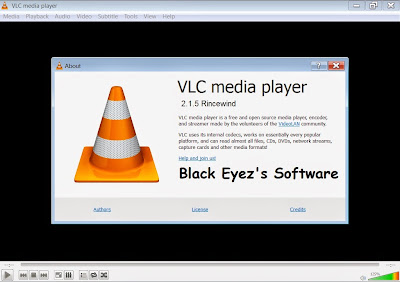
Download Link:-
 |
| Download VLC |
Password is: blackeyez007.blogspot.com
Available link for download
Thursday, January 12, 2017
VLC Media Player Latest Version Free Download
VLC Media Player Latest Version Free Download
VLC media player is a highly portable multimedia player for various audio and video formats as well as DVDs, VCDs, and various streaming protocols without external codec or program.
It can also be used as a server to stream in unicast or multicast in IPv4 or IPv6 on a high-bandwidth network.
VLC can play:
Download Here:
It can also be used as a server to stream in unicast or multicast in IPv4 or IPv6 on a high-bandwidth network.
VLC can play:
- MPEG-1, MPEG-2 and MPEG-4 / DivX files from a hard disk, a CD-ROM drive, and so on
- DVDs, VCDs, and Audio CDs
- From satellite cards (DVB-S)
- Several types of network streams: UDP/RTP Unicast, UDP/RTP Multicast, HTTP, RTSP, MMS, etc.
- From acquisition or encoding cards (on GNU/Linux and Windows only)
Download Here:
Available link for download
Saturday, December 31, 2016


Friday, October 28, 2016
VLC Media Player 2 2 1 64 bit
VLC Media Player 2 2 1 64 bit

Taking Video Snapshots With VLC Media Player
VLC Media Player 2.2.1 (64-bit)
VLC Media Player is the most popular and robust multi format, free media player available. The open source media player was publically released in 2001 by non-profit organization VideoLAN Project. VLC Media Player quickly became very popular thanks to its versatile multi-format playback capabilities. It was aided by compatibility and codec issues which rendered competitor media players like QuickTime, Windows and Real Media Player useless to many popular video and music file formats. The easy, basic UI and huge array of customization options have enforced VLC Media Player?s position at the top of the free media players.
Flexibility
VLC plays almost any video or music file format you can find. At its launch this was a revolution compared to the default media players most people were using that often crashed or displayed ?codecs missing? error messages when trying to play media files. VLC can play MPEG, AVI, RMBV, FLV, QuickTime, WMV, MP4 and a shed load of other media file formats. For a full list of compatible file formats please click here. Not only can VLC Media Player handle loads of different formats, VLC can also playback partial or incomplete media files so you can preview downloads before they finish.
Easy to Use
VLC?s UI is definitely a case of function over beauty. The basic look does however make the player extremely easy to use. Simply drag and drop files to play or open them using files and folders then use the classic media navigation buttons to play, pause, stop, skip, edit playback speed, change the volume, brightness, etc. A huge variety of skins and customization options mean the standard appearance shouldn?t be enough to prevent you choosing VLC as your default media player.
Advanced Options
Don?t let VLC Media Player?s simple interface fool you, within the playback, audio, video, tools and view tabs are a huge variety of player options. You can play with synchronization settings including a graphic equalizer with multiple pre-sets, overlays, special effects, AtmoLight video effects, audio spatializer and customizable range compression settings. You can even add subtitles to videos by adding the SRT file to the video?s folder.
Summary
VLC Media Player is quite simply the most versatile, stable and high quality free media player available. It has rightly dominated the free media player market for over 10 years now and looks like it may for another 10 years thanks to the constant development and improvement by VideoLAN Org.
VLC Media Player is now available for iOS too.

Available link for download
Thursday, October 20, 2016
VLC Media Player 2 2 1 32 bit
VLC Media Player 2 2 1 32 bit
i
Taking Video Snapshots With VLC Media Player
VLC Media Player 2.2.1 (32-bit)
VLC Media Player is the most popular and robust multi format, free media player available. The open source media player was publically released in 2001 by non-profit organization VideoLAN Project. VLC Media Player quickly became very popular thanks to its versatile multi-format playback capabilities. It was aided by compatibility and codec issues which rendered competitor media players like QuickTime, Windows and Real Media Player useless to many popular video and music file formats. The easy, basic UI and huge array of customization options have enforced VLC Media Player?s position at the top of the free media players.
Flexibility
VLC plays almost any video or music file format you can find. At its launch this was a revolution compared to the default media players most people were using that often crashed or displayed ?codecs missing? error messages when trying to play media files. VLC can play MPEG, AVI, RMBV, FLV, QuickTime, WMV, MP4 and a shed load of other media file formats. For a full list of compatible file formats please click here. Not only can VLC Media Player handle loads of different formats, VLC can also playback partial or incomplete media files so you can preview downloads before they finish.
Easy to Use
VLC?s UI is definitely a case of function over beauty. The basic look does however make the player extremely easy to use. Simply drag and drop files to play or open them using files and folders then use the classic media navigation buttons to play, pause, stop, skip, edit playback speed, change the volume, brightness, etc. A huge variety of skins and customization options mean the standard appearance shouldn?t be enough to prevent you choosing VLC as your default media player.
Advanced Options
Don?t let VLC Media Player?s simple interface fool you, within the playback, audio, video, tools and view tabs are a huge variety of player options. You can play with synchronization settings including a graphic equalizer with multiple pre-sets, overlays, special effects, AtmoLight video effects, audio spatializer and customizable range compression settings. You can even add subtitles to videos by adding the SRT file to the video?s folder.
Summary
VLC Media Player is quite simply the most versatile, stable and high quality free media player available. It has rightly dominated the free media player market for over 10 years now and looks like it may for another 10 years thanks to the constant development and improvement by VideoLAN Org.
Looking for the Mac version of VLC Media Player? Download Here
Technical
Title: VLC Media Player 2.2.1 (32-bit)
Filename: vlc-2.2.1-win32.exe
File size: 27.51MB (28,849,904 bytes)
Requirements: Windows XP / Vista / Windows7 / Windows8
Languages: Multiple languages
License: Open Source
Date added: April 17, 2015
Author: VideoLAN.org
www.videolan.org
www.videolan.org
Homepage: www.videolan.org
MD5 Checksum: B8C997E772BE343E1664FEE14C1FB9B7
Change Log
# Codec:
* Fix compilation with older libavcodec versions
* Fix some VP9 decoding
* Fix flac crashes
* Fix lpcm channel ordering
* Fix potential NULL dereference in dmo
* Fix teletext framing code in DVB PES packets
* Fix potential buffer overflow in schroendinger decoder (CVE-2014-9629)
* Fix AAC samplerate
# Demuxers:
* Fix MP4 chapters
* Fix MKV overseeking, introducing slowness over network shares
* Fix crash when playing SPC files
* Fix ATRAC3 playback in MKV
* Revert to older ASX code
* Workaround TS issue with mpeg-audio
# Access:
* Fix sftp read and close sockets
* Fix DTV build with Linux DVB versions < 5.8
* Fix UDP/RTP input on Windows
# Audio output:
* Fix Alsa HDMI plugs
* Improve Alsa output, with larger buffers
* Fix DirectSound output with multi-channel files
# OS X:
* Fix numerous crashes in the UI
* Fix video-wallpaper mode
* Fix race when starting VLC from command line
# Qt:
* Fix recent items behaviour
* Fix rotation filter activation
* Fix mux modules names for the streaming wizard
# Win32:
* Timestamp the signature of the dlls
* Fix extensions registration during install
* Fix extensions dialog crash
* Default to no DxVA decoding
# libVLC:
* fix libvlc_media_get_stats
# Translations:
* Update of Afrikaans, Albanian, Azerbaijani, Catalan, Czech, Danish, Dutch, English (United Kingdom), Finnish, French, German, Hebrew, Hindi, Italian, Japanese, Korean, Latvian, Macedonian, Malay, Modern Greek, Norwegian BokmǾl, Norwegian Nynorsk, Polish, Portuguese, Russian, Scottish Gaelic, Serbian, Simplified Chinese, Slovak, Slovenian, Spanish, Swedish, Tamil, Thai, Traditional Chinese, Turkish, Ukrainian translations
* Fix compilation with older libavcodec versions
* Fix some VP9 decoding
* Fix flac crashes
* Fix lpcm channel ordering
* Fix potential NULL dereference in dmo
* Fix teletext framing code in DVB PES packets
* Fix potential buffer overflow in schroendinger decoder (CVE-2014-9629)
* Fix AAC samplerate
# Demuxers:
* Fix MP4 chapters
* Fix MKV overseeking, introducing slowness over network shares
* Fix crash when playing SPC files
* Fix ATRAC3 playback in MKV
* Revert to older ASX code
* Workaround TS issue with mpeg-audio
# Access:
* Fix sftp read and close sockets
* Fix DTV build with Linux DVB versions < 5.8
* Fix UDP/RTP input on Windows
# Audio output:
* Fix Alsa HDMI plugs
* Improve Alsa output, with larger buffers
* Fix DirectSound output with multi-channel files
# OS X:
* Fix numerous crashes in the UI
* Fix video-wallpaper mode
* Fix race when starting VLC from command line
# Qt:
* Fix recent items behaviour
* Fix rotation filter activation
* Fix mux modules names for the streaming wizard
# Win32:
* Timestamp the signature of the dlls
* Fix extensions registration during install
* Fix extensions dialog crash
* Default to no DxVA decoding
# libVLC:
* fix libvlc_media_get_stats
# Translations:
* Update of Afrikaans, Albanian, Azerbaijani, Catalan, Czech, Danish, Dutch, English (United Kingdom), Finnish, French, German, Hebrew, Hindi, Italian, Japanese, Korean, Latvian, Macedonian, Malay, Modern Greek, Norwegian BokmǾl, Norwegian Nynorsk, Polish, Portuguese, Russian, Scottish Gaelic, Serbian, Simplified Chinese, Slovak, Slovenian, Spanish, Swedish, Tamil, Thai, Traditional Chinese, Turkish, Ukrainian translations
Available link for download
Subscribe to:
Posts (Atom)