Showing posts with label update. Show all posts
Showing posts with label update. Show all posts
Tuesday, April 25, 2017
Windows update Error 0x8024D007
Windows update Error 0x8024D007
Finding a Solution for the 0ž8024D007 Error
This is a fairly common Windows Update error and hopefully this article will help you resolve the problems you are having.
What Causes Windows Error 0ž8024D007
A quick scan of the online technical forums and blogs reveal folks asking for help with this windows error. Your question may be the same as this typical request:
I?m running Windows Vista (Home Premium) When I Click ?Check for Updates ?in Windows Update I get the following error
?Windows could not search for new updates Error (s) found: 0ž8024D007 ?
OR
I?m running Windows XP and When I Click? Check for Updates? in Windows Update I get the following error:
?Error number: 0ž8024D007, the website has encountered a problem and cannot display the page you are trying to view. The options provided below might help you solve the problem?.
The 0ž8024D007 error I often caused by insufficient access permissions to files or registry keys on the PC in question.
So what can you do?
0ž8024D007 ? Resolution Suggestion One:
There may be an issue with BITS so you try to register the following system files:
In Windows XP go to the Run item on the start menu, and type:
In Windows Vista go to the Start Search box on the start menu and type:
regsvr32 qmgr.dil
regsvr32 qmgrprxy.dil
These files are associated with the Windows Update Service.
Qmgr.dll ? This file is the Background Intelligent Transfer service.
Qmgrprxy.dll - This file is the Background Intelligent Transfer service proxy
BITS is a background file ? transfer mechanism and queue manager. Requests to BITS are submitted and the files can transferred in a throttled way so the user is not affected by the bandwidth that is consumed. Requests persist across disconnections and computer restarts until the files are transferred, at which time the requesting program is invoked and notified that the transfer is complete. This feature makes it possible for low-priority download operations to complete in the background without affecting the user?s bandwidth. BITS is a background component and has no user interface, nor can it be uninstalled. This component is a part of Windows Automatic Update.
0ž8024D007 ? Resolution Suggestion Two:
There may be an issue with the file wups2.dll so try to register it:
In Windows XP go to the Run item on the start menu, and type:
In Windows Vista go to the Start Search box on the start menu and type:
For 32-bit Windows enter the following lines:
net stop wuauserv
regsvr32 %windir% system32wups.dll
net start wuauserv
For 64-bit Windows, the second line differs due to the location of the DLL file:
net stop wuauserv
regsvr32 %windir% syswow64wups2.dll
net start wuauserv
Available link for download

Friday, April 21, 2017
Synaptic Driver Update Feature Must See!
Synaptic Driver Update Feature Must See!

(Opened FTP Ports required to download the driver)
Synaptics HP Touchpad driver unlocks all multitouch gestures on all touchpad > version 6.2.
Now I officially have multitouch on my Acer Aspire 4530!
You guys seriously must update to this driver. One Word: Awesome!
New Features:
-3 Fingers Application Launch
-2 Fingers Scrolling
-Flick Function etc...
Please note the amount of features unlocked by this driver may vary according to the touchpad version you own.
You need at least a V6.2 Touchpad.

To install:


Continue to Click Yes when you see install messages.
Restart the Computer.
Next:
Double Click:
 |
| The filename may differ due to different versions |
Continue to Click Yes to All Messages.
After that restart.
To Access The Configuration Utility:

Available link for download
Monday, April 10, 2017
USB 3 0 Controller Firmware Update
USB 3 0 Controller Firmware Update
Nowadays upgradable firmware is in all devices.
For those who dont know that USB 3.0 Firmware is actually upgradable, the additional features you can unlock makes doing this worthwhile.
Why do you want to upgrade firmware?
There would be new features available to newer firmware and upgrading firmware is as easy as ABC.For example new firmware from ASMedia for ASM1051 supports 3 TB HDD.
You can also unlock additional features that the vendor lock out by default.

Lastly vendors especially External Mobile Harddisk manufacturers use old firmware, from my experience disk copy is much faster after upgrade.
How to upgrade firmware?
What you need:- Find out the USB 3.0 Controller Chip Make and Model most of the time they are either JMicron or ASMedia.
- Download the firmware updates from station-drivers.com
- Windows OS to flash the firmware
- Open up the casing should be a no brainer if you are able to put a Harddisk Drive in. If you are not able to open it up try Google for the make and model
- Look at the controller IC there should be a Controller IC.
- The IC is usually very distinct and obvious. Read the Serial Model the picture below reads: ASMedia 1061.
- Find the firmware online Station-Drivers has all the harddisk controller firmware updates from JMicron and ASMedia.
- Download the firmware. Before you flash backup your Device ID, Serial Number, make and model in case it is erased during flashing. The firmware update tools runs on Windows so download and flash it accordingly. Should be a no brainer to do so being a point and click application. You can also custom configure what you want to enable in the firmware using the additional config tool.


Vantec NexStar 3 SuperSpeed NST-280S3-BK 2.5" harddisk enclosure uses JMicron JMS 539 USB 3.0 Controller

Connectland BE-USB3-ZH3532 3.5" harddisk enclosure uses ASMedia ASM1051 USB 3.0 Controller

Hitachi Touro Mobile 2.5" harddisk uses
ASMedia ASM1051 USB 3.0 Controller
Available link for download
Wednesday, March 29, 2017
Update Lollipop Di Xiaomi Yang Diam Diam
Update Lollipop Di Xiaomi Yang Diam Diam
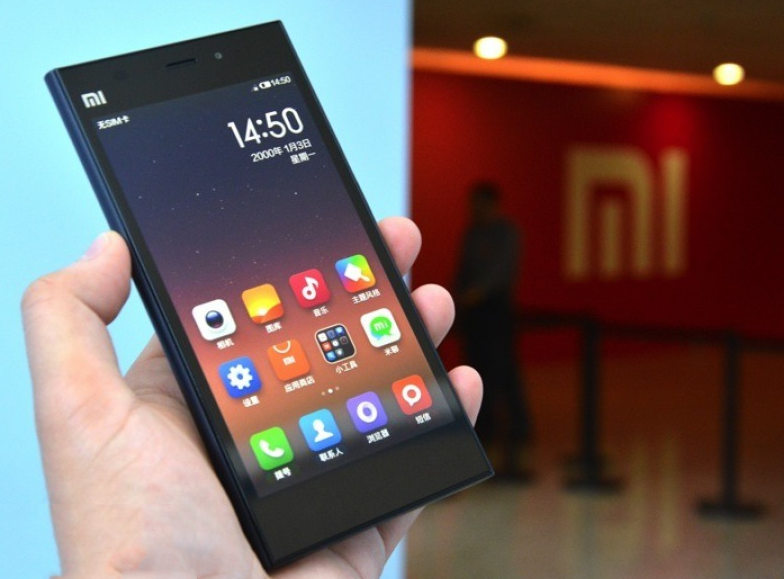
Lollipop bakal Bikin Xiaomi Lebih Manis
Jika beberapa vendor smartphone sudah mengabarkan akan segera memberikan Android Lollipop pada smartphone produksinya, Xiaomi, si pemain baru yang belakangan ini produknya semakin digandrungi ternyata lebih memilih diam-diam dalam hal mengembangkan Lollipop untuk smartphone keluarannya.Namun, tetap saja desas desus Lollipop di Smartphone Android rilisan Xiaomi sudah mulai terdengar.
 |
| credit: skytechblog.com |
Lihat baik-baik poto di atas, terlihat bukan Xiaomi, memulai memulai pengembangan Lollipop dari salah satu ponsel flagshipnya, Mi3. Hal itu makin diperkuat oleh tampilan menu ?about phone? di ponsel tersebut dimana bagian Android Version-nya yang menunjukkan versi 5.0.
Soal waktu rilis, saya rasa masih terlalu dini untuk dibicarakan. Namun besar kemungkinan, saat diluncurkan, nantinya Xiaomi juga akan mengemasnya dalam balutan OS MIUI.
Xiaomi sendiri juga belum lama ini merilis MIUI v6 yang berbasis Android 4.4 KitKat. Jadi untuk Lollipop sepertinya akan hadir sebagai MIUI versi selanjutnya.
Informasi lain yang diperoleh dari bocoran itu adalah Mi3 yang digunakan adalah versi global. Berarti sangat mungkin update Lollipop nanti akan langsung hadir untuk semua ponsel Xiaomi di negara manapun, bukan per region seperti yang kerap dilakukan produsen ponsel lain. So, selamat bergembira teman-teman pengguna Xiaomi Mi3
Available link for download
Tuesday, March 21, 2017
Tips Fix Microsoft Windows Update Issues
Tips Fix Microsoft Windows Update Issues
Microsoft creates direct links where they are steps and troubleshooting articles/tips that you could follow:
1.)Fix Microsoft Windows Update Issues
https://support.microsoft.com/en-us/gp/windows-update-issues/en-us
To speed up troubleshooting you can download this .cab
http://go.microsoft.com/fwlink/?LinkId=231149
Run now
2.) Otherwise you could follow this article and manually reset it:
How do I reset Windows Update components
https://support.microsoft.com/en-us/kb/971058
Here they are some parts:
Windows 8.1, Windows 8, and Windows 7

The Automatically diagnose and fix common problems with Windows Update troubleshooter may automatically fix the problem described in this article. learn moreThis troubleshooter fixes many problems. | Run now |
3.) If you need to install latest windows update agent:
| perating system | Update |
|---|---|
| All supported x86-based versions of Windows 8 (KB2937636) |  Download the package now. Download the package now. |
| All supported x64-based versions of Windows 8 (KB2937636) | Download the package now. |
| All supported x64-based versions of Windows Server 2012 (KB2937636) | Download the package now. |
Stand-alone packages for Windows 7 SP1 and Windows Server 2008 R2 SP1
The following files are available for download from Windows Update.| Operating system | Update |
|---|---|
| All supported x86-based versions of Windows 7 SP1 | Download the package now. |
| All supported x64-based versions of Windows 7 SP1 | Download the package now. |
| All supported x86-based versions of Windows Server 2008 R2 SP1 | Download the package now. |
| All supported x64-based versions of Windows Server 2008 R2 SP1 | Download the package now. |
| All supported Itanium-based versions of Windows Server 2008 R2 SP1 | Download the package now. |
More details:
https://support.microsoft.com/en-us/kb/949104
Otherwise:
To obtain version 7.4.7600.226 of the Windows Update Agent, click one of the following links as appropriate for the operating system:
More details:
https://support.microsoft.com/en-us/kb/946928
Otherwise:
To obtain version 7.4.7600.226 of the Windows Update Agent, click one of the following links as appropriate for the operating system:
x86-based versions of Windows
Download the WindowsUpdateAgent30-x86.exe package now.x64-based versions of Windows
Download the WindowsUpdateAgent30-x64.exe package now.Itanium-based versions of Windows
Download the WindowsUpdateAgent30-ia64.exe package now.
More details:
https://support.microsoft.com/en-us/kb/946928
4.) Run this second Microsoft fix it:
http://windows.microsoft.com/en-us/windows/troubleshoot-problems-installing-updates#1TC=windows-7
- Click this button:
Fix this problem - In the File Download dialog box, click Run, and then follow the steps in the wizard.
- Open Windows Update, and try to install the update again.

[APPENDIX]
Manually reset Windows Update components
To reset the Windows Update components, follow these steps:
- Open a command prompt. To do this, use one of the following methods, depending on your version of Windows:
- Windows 8.1 and Windows 8: From the Start screen, swipe in from the right side to display the charms, select Search, and then search for cmd. (Or, if you are using a keyboard and mouse, type cmd at the Start screen.) In the search results, press-and-hold or right-click Command Prompt, and then select Run as Administrator.
- Windows 7 and earlier versions: Press the Windows logo key + R, type cmd in the Run box, and then press Enter. Right-click cmd, and then select Run as Administrator.
- Stop the BITS service, the Windows Update service, and the Cryptographic service. To do this, at a command prompt, type the following commands. Make sure that you press Enter after you type each command.
- net stop bits
- net stop wuauserv
- net stop appidsvc
- net stop cryptsvc
- Delete the qmgr*.dat files. To do this, at a command prompt, type the following command, and then press Enter:Del "%ALLUSERSPROFILE%Application DataMicrosoftNetworkDownloaderqmgr*.dat"
- If this is your first attempt at resolving your Windows Update issues by following the steps in this article, you should skip step 4 and go to step 5. You should follow step 4 at this point in the troubleshooting only if you cannot resolve your Windows Update issues after you follow all steps except step 4. (Step 4 is performed by the "Aggressive" mode of the Fix it Solution that was mentioned earlier.)
- Rename the softare distribution folders backup copies. To do this, at a command prompt, type the following commands. Make sure that you press Enter after you type each command.
- Available link for download
- Rename the softare distribution folders backup copies. To do this, at a command prompt, type the following commands. Make sure that you press Enter after you type each command.
Friday, March 17, 2017
Update Android 5 0 Lollipop Note 3 SM N900 Stock Rom ChÇðnh Th ¯¸c T ¯® Samsung
Update Android 5 0 Lollipop Note 3 SM N900 Stock Rom ChÇðnh Th ¯¸c T ¯® Samsung

Sau khi s? ra m?t c?a phiˆn b?n Android Lollipop 5.0 ra m?t. Hi?n n…y phiˆn b?n 5.0 ?Æ ???c h? tr? trˆn Galaxy Note 3 - N900. Bƒy gi? mnh s? h??ng d?n c c b?n c ch up rom Lollipop 5.0 cho Samsung Galaxy Note 3 SM-N900.
I - C“ng c? c?n thi?t:
- Rom Lollipop SM-N900 (d?ng OTA update.zip): https://www.fshare.vn/file/AF1LLWKS1I6Z
- Recovery TWRP: Recovery
- Root: Super SU
- Rom G?c: Link
- Odin: Odin_v3.10.0
II - Ti?n h…nh c…i ??t
1/ C…i ??t Recovey:
- ??a m y v? Dowload Mod b?ng c ch: t?t ngu?n, b?m c—ng 1 l£c t? h?p ph¡m n£t home , volumn - v… n£t ngu?n, sau khi m y v…o m…n hnh c¢ ch? ti?p t?c nh?n thˆm 1 l?n volumn + n?a th s? v…o ???c dowload mod
- Sau khi ?Æ v…o ???c dowload mod, c?m ?iˆn tho?i k?t n?i v?i m y t¡nh ? c?ng ID:COM s? hi?n ra s? c?ng COM ?Æ k?t n?i m…u l?c nh‚
- Ch?n trˆn Odin ch?n ? m?c AP ch?n ??n file openrecovery-twrp-2.8.0.0-ha3g.img.tar, ch?n Open. B?m start v…o ??i Odin flash v… b o Pass l… xong nh‚.
2/ C…i ??t rom 5.0:
Ch£ ì: Ch? c?p nh?t t? n?n rom stock, n?u m y c?a b?n ?ang s? d?ng rom cook th c?n up v? rom stock tr??c
- Copy file Rom (update.zip) v…o b? nh? m y ho?c th? nh?
- Copy file Rom (update.zip) v…o b? nh? m y ho?c th? nh?
- V…o recovery, ch?n Install ch?n file rom update.zip
- Sau khi qu trnh c?p nh?t ho…n t?t ti?p t?c ch?n factory reset/wipe date ch?n Yes
- Sau ?¢ kh?i ??ng l?i l… ho…n t?t qu trnh c?p nh?t Android Lollipop cho Note 3 N900
3/ H??ng d?n root:
- Hi?n t?i m y c?a b?n ?Æ c¢ Recovery, v…o recovery b?ng t? h?p ph¡m: volumn + , home v… ngu?n
- V…o recovery, chon Install ch?n file UPDATE-SuperSU-v2.40.zip, k‚o thanh tr??t t? tr i qua ph?i, sau khi flash xong ch?n reboot system ?? kh?i ??ng l?i!
- Ho…n th…nh
Available link for download
Saturday, March 11, 2017
Update Vine for Android Capture Widget Channels Revine and Camera Tools
Update Vine for Android Capture Widget Channels Revine and Camera Tools

The good news for you Android users Vine. Having recently Vine presents a number of updates for iOS, now owned video-sharing service Twitter also provide additional features in Android users, including camera tools, channels, Revine and many others.
But there is one feature that distinguishes Vine Android update with iOS, which capture widget that can be added to the home screen. This feature allows you to display the recording interface capture only the tap on the widget.
Like the iOS update, Vine for Android now also allows you to post Revine other users. There is also a new tool for recording, including grid, focus, and other enhancements. Not forgetting also channel support for browsing a specific topic, such as Sports, Family, Dogs, Cats and Other. Update is now available in the Google Play Store. Here is a complete list of updates:
- Browsing or submit a new post up to 15 channels
- Revining
- Share your favorite posts with followers in a single tap
- Capture Widget
- Capture new tools
- Camera new tools: focus, grid and ghost tools
Available link for download
Sunday, March 5, 2017
Windows 7 AIO Terbaru Update November 2015
Windows 7 AIO Terbaru Update November 2015

Cadas, ini ni Windows 7 yang paling banyak dicari oleh pecinta Internet, Windows 7 AIO, sebenarnya apa sih Windows 7 AIO atau Pengertian Windows AIO? Baiklah, saya akan menjelaskannya secara singkat dan semoga dapat dipahami.
Windows AIO adalah singkatan dari All In One, jadi didalam Windows AIO itu terdapat berbagai versi Windows, semisal Windows 7 AIO berarti didalam file tersebut ada Windows 7 dengan berbagai versi didalam 1 installer, biasanya:
- Windows 7 Home Premium
- Windows 7 Professional
- Windows 7 Enterprise
- Windows 7 Ultimate
Dan mantebnya lagi, didalam Installer Windows 7 AIO ini tidak hanya terdapat versi 32 bit atau 64 bit tapi dua-duanya ada dan tersedia juga versi Preactivated (sudah di aktivasi). Cukup segitu aja basa basinya, sekarang lanjut pembahasan.
:: File Info ::
- File: W7.AIO.OEM.ESD.en-US.Nov2015.iso
- Sources: X17-59463 & dvd-677710 | X17-59465 & dvd-677651
- Size: 4,60GB
- Format: Bootable ISO
- Languages: En-US
:: Contents ::
- Integrated / Pre-installed in Audit Mode:
- Internet Explorer 11
- Important & Security Updates - 2015-11-10
- .NET Framework 4.6 Hotfix Rollup (KB3095338)
:: Features ::
- UEFI-boot can be set with attached USB-tool Rufus.
- Diagnostics and Recovery Toolset 8.1 (Microsoft DaRT)
- install.wim compressed to recovery format (install.esd)
:: Edition Included ::
32bit/x86:
- Windows 7 Home Premium
- Windows 7 Professional
- Windows 7 Enterprise
- Windows 7 Ultimate
- Windows 7 Home Premium Pre-Activated
- Windows 7 Professional Pre-Activated
- Windows 7 Enterprise Pre-Activated
- Windows 7 Ultimate Pre-Activated
- Windows 7 Home Premium OEM-Activated
- Windows 7 Professional OEM-Activated
- Windows 7 Enterprise OEM-Activated
- Windows 7 Ultimate OEM-Activated
64bit/x64:
- Windows 7 Home Premium
- Windows 7 Professional
- Windows 7 Enterprise
- Windows 7 Ultimate
- Windows 7 Home Premium Pre-Activated
- Windows 7 Professional Pre-Activated
- Windows 7 Enterprise Pre-Activated
- Windows 7 Ultimate Pre-Activated
- Windows 7 Home Premium OEM-Activated
- Windows 7 Professional OEM-Activated
- Windows 7 Enterprise OEM-Activated
- Windows 7 Ultimate OEM-Activated
:: Download Link ::
Free Download Windows 7 AIO Updated November 2015 - Single Link - Part Link
:: Part Link - 1GB/4 + 500MB/1 ::
- Openload: Part 1 | Part 2 | Part 3 | Part 4 | Part 5
- Dailyuploads: Part 1 | Part 2 | Part 3 | Part 4 | Part 5
:: SINGLE LINK - 4.5GB ::
- Uploadex
- Uptobox
Copiapop - Uploading...
:: ScreenShot ::


Thanks to: Team-OS
Available link for download
Sunday, February 26, 2017
Veeam Backup Replication 8 0 Update 3 Released
Veeam Backup Replication 8 0 Update 3 Released
Here they are full release notes and download link (you must register)
http://www.veeam.com/kb2068
To install this update you need to stop "Veeam Backup Service", install update, start "Veeam Backup Service". When you launch Veeam B&R for first time you will be prompted to update Veeam client and any other veeam server repository/Proxy.
Solution
New Features and Enhancements
Microsoft
Microsoft
- Support for Windows 10 as guest virtual machines (VMs), including application-aware processing.
- Support for installation of Veeam Backup & Replication and all of its components on Windows 10.
VMware
- Support for vSphere 6.0 Update 1.
- Added ability to convert "VMware Tools not found" job warning to informational event. To enable this behavior, set DisableVMwareToolsNotFoundWarning (REG_DWORD) registry value to 1.
Linux
- Support for the following additional SSH ciphers: aes128-ctr, aes192-ctr, aes256-ctr, aes192-cbc and aes256-cbc.
Veeam Explorer for Microsoft SQL Server
- Log truncation is automatically skipped for stopped and unsupported SQL Server instances to prevent errors from being logged.
- Preferred network settings will now also apply to transaction log backup jobs.
- Support for SQL Servers using non-standard port number.
Veeam Explorer for SharePoint
- Support for ADFS authentication.
- Support for UPN credentials.
SureBackup
- Proxy appliance will now respond to ping from within Virtual Lab to prevent firewalls automatically blocking its network as public.
Other
- Removed weakly encrypted username and password logging from guest processing components using networkless (VIX) guest interaction mode. Veeam thanks Pasquale Fiorillo and Francesco Ongaro of ISGroup for vulnerability discovery.
- Improved performance of certain user interface operations, such as opening Backups node in large environments.
- Reduced load on SQL Server hosting product configuration database, while improving SQL interaction reliability in large environments.
- Improved performance of configuration backup in large environments.
- Minor enhancements and bug fixes in various product areas.
Available link for download
Tuesday, February 7, 2017
Update Harga Dan Spesifikasi ADVAN X7
Update Harga Dan Spesifikasi ADVAN X7

- Cara Jitu Hard Reset ADVAN X7
- Tutorial Lengkap Cara Flashing ADVAN X7
Dan di kesempatan kali ini admin akan menshared spesifikasi dan harga ADVAN X7 simak ya pembahasannya di bawah ini:
Harga Advan Vandroid X7
Harga Advan Vandroid X7 Baru : Rp 1.099.000,-
Harga Advan Vandroid X7 Bekas : Rp ?
Tablet Advan Vandroid X7 ini telah diluncurkan pada awal Agustus 2015 dengan menyasak kalangan pelajar dan entry level serta pengguna pemula. Harga Advan Vandroid X7terbaru di Indonesia dibanderol di harga Rp 1.099.000 per unitnya yang memang cukup terjangkau dan murah meriah. Bagi anda yang tertarik memiliki tablet Advan Vandroid X7 ini dapat langsung mendapatkannya di outlet resmi Advan di kota anda maupun di beberapa toko online favorit sobat pembaca sekalian.
| Network | 2G bands | GSM 850 / 900 / 1800 / 1900 |
| 3G bands | HSDPA 2100 | |
| 4G bands | No | |
| Speed | HSPA 21/5.76 Mbps | |
| GPRS | Yes | |
| EDGE | Yes | |
| BODY | Body dimension | To be confirmed |
| Body weight | To be confirmed | |
| SIM | Dual SIM ? Dual Standby (GSM-GSM) | |
| DISPLAY | Display type | IPS LCD capacitive touchscreen, 16M colors |
| Display size | 7.0 inches | |
| Resolution | 1024 x 600 pixels (~170 ppi pixels density) | |
| Multitouch | Yes | |
| Protection | No | |
| SOUND | Alert type | Vibration; MP3, WAV ringtones |
| Loudspeaker | Yes | |
| 3.5 mm jack | Yes | |
| MEMORY | Internal memory | 8 GB, 1 GB RAM |
| Card slot | microSD up 32 GB | |
| PLATFORM | OS | Android OS v5.1 Lollipop |
| Chipset | Intel Atom X3-C3230RK | |
| CPU | Quad-core 1.0 GHz | |
| GPU | Mali-450MP4 | |
| COMMS | WLAN | Wi-Fi 802.11 b/g/n, Hotspot, Wi-Fi Direct |
| Bluetooth | v4.0, A2DP | |
| USB | microUSB v2.0, USB OTG Support | |
| GPS | Yes, with A-GPS | |
| Radio | FM radio | |
| CAMERA | Primary camera | 2 MP, 1600 x 1200 pixels, LED Flash |
| Features | Yes, Geo-tagging, Face detection, Digital zoom | |
| Video | Yes | |
| Secondary camera | VGA | |
| FEATURES | Sensors | Accelerometer, Proximity |
| Messaging | SMS(threaded view), MMS, Email, IM | |
| Browser | HTML | |
| Java | No | |
| Colors | White-Silver | |
| ? MP3/AAC+/AMR/eAAC+/FLAC ? MP4/H.264/H.263 player ? Photo/video editor ? Document viewer ? Wireless display (WiDi/Miracast) ? Preinstall apps | ||
| BATTERY | Non Removable Li-Ion 2500 mAh battery | |
| Stand-by | ? | |
| Talk time | ? | |
| Music play |
Available link for download
Subscribe to:
Posts (Atom)