Tuesday, April 18, 2017
Stop pop up ads and adware in Edge Browser
Stop pop up ads and adware in Edge Browser
How stop annoying adverts from taking over the new Microsoft Edge browser? I get this question a lot, especially when most users decided to upgrade to Windows 10. It becomes even more frustrating when people realize that they cant use ad blockers because Microsoft Edge doesnt support add-ons and extensions. As you may know, most pop-up ads are caused by adware. Thats why you might need to remove adware first before blaming Edge browser for not doing enough to protect you from intrusive adverts. Adware, or Advertising Supported Software to give it its full name is something which you should be aware of even if you use Microsoft Edge. This is the name given to software programs that have been designed to display, or download, pop-up adverts onto your computer screen. Of course, advertising is a form of marketing ? we all know that ? and of course the reason for adwares existence is to generate a source of income for its programmer or owner. And while this is good news for programmers, advertisers and brands that use adware, where does that leave the likes of you and me? Can adware actually do us harm like so many of the other types of malicious software that are out there?
The way that adware works
Adware works in one of two ways and the adverts themselves will either appear as a pop-up window or they will be embedded in the Edges interface. Adverts can be fairly discreet and sit neatly at the edges of a page of a website, or they can be in your face, thoroughly garish pop-up windows.
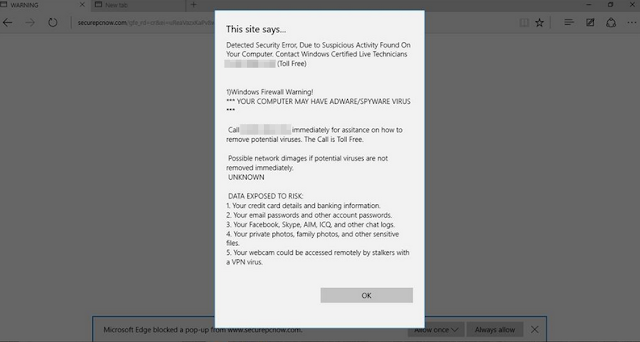
Theres probably no one who will argue that pop-up windows arent the bane of a computer users life ? they can be annoying to the point of distraction! But is adware something other than just a nuisance and could it actually be doing you any damage?
The issues with adware
Many people take umbrage with adware thanks to the way that it monitors which websites you are looking at. You see, at the point of installation, adware will also install a component which enables the programmer to track which websites you visit and see which pages or products you look at upon those pages. They are then able to customize the type of adverts they show you based on what they perceive to be your tastes, needs or interests.
It goes without saying that targeted adverts have a higher chance of tempting you to click on them to discover more, rather than adverts for completely random goods that you have no interest in whatsoever.
Who makes adware and why?
Well aside from the obvious reason why anyone creates any form of advertising, adware is also used by the software developers who make it to attempt to recover the costs they incurred when they developed another app or program. You will download their latest must have app or even a program that enables you to work smarter but unbeknown to you, the adware will be bundled with that program.
Is adware dangerous?
There are two sides to this ongoing argument. Many people dont worry too much about the existence of adware as they see it as a necessary evil if they want to be able to download free apps, files or programs. Other people however find the fact that it tracks your usage extremely intrusive and will argue that because the adware was packaged surreptitiously with another program to spy on you this makes it potentially dangerous.
How do I stop pop-up adverts in Microsoft Edge?
First of all, scan your computer with anti-malware software, especially if you are still not familiar with Windows 10. Adwares programmers are smart and try to hide malicious files on your computer making it difficult to find and remove each malicious file. To remove adware from your computer and stop the absolutely annoying ads, please follow the steps in the removal guide below. If you have any questions, please leave a comment down below. Good luck and be safe online!
Written by Michael Kaur, http://deletemalware.blogspot.com
Stop pop-up ads and adware in Edge Browser:
1. End Edge browser task in Task Manager.
2. Disconnect your computer from the Internet.
3. Start Edge browser and just before the offending pop-up appears, press Ctrl+T (several times if necessary). This will allow you to get into Edge settings and clear cookies, etc. Next time you start all should be well. If you are still getting the annoying ads, do the following:
a. Close Edge browser again.
b. Navigate to
C:Users[your-user-name]AppDataLocalPackagesMicrosoft.MicrosoftEdge_xxxxxxACMicrosoftEdgeUserDefaultRecoveryActive
c. Delete everything on that directory and open Edge browser.
4. Download anti-malware software and run a full system scan. It will detect and remove adware from your computer. You may then follow the manual removal instructions below to remove the leftover traces of this adware. Hopefully you wont have to do that.

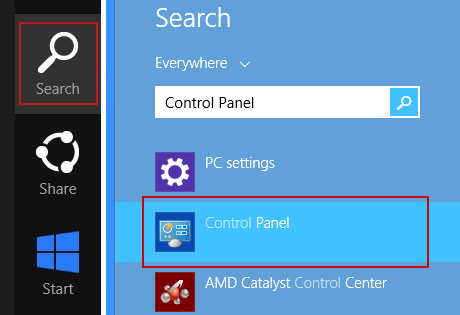
5. Remove adware related programs from your computer using the Uninstall a program control panel. Simply drag your mouse pointer to the right edge of the screen, select Search from the list and search for "control panel".
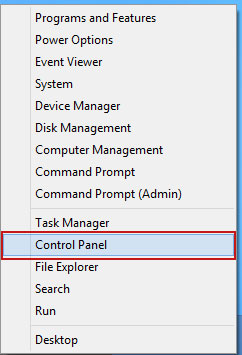
Or you can right-click on a bottom left hot corner (formerly known as the Start button) and select Control panel from there.
6. When the the Uninstall a Program screen is displayed, scroll through the list of currently installed programs and remove the following:
- PlayGEM
- GoSave
- Extag
- SaveNewaAppz
- and any other recently installed application
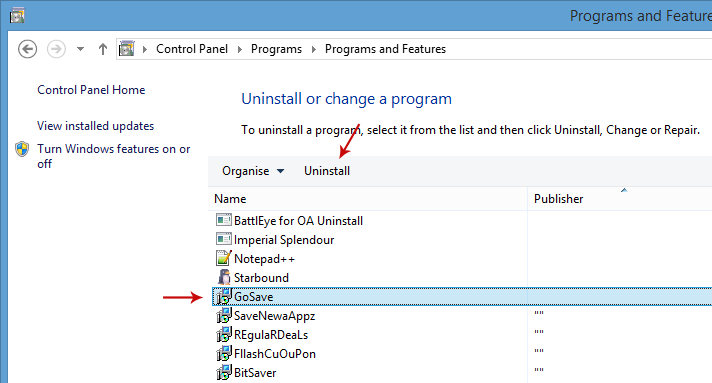
Simply select a suspicious application and click Uninstall up near the top of that window. When youre done, please close the Control Panel screen.
Available link for download

Monday, April 3, 2017
Stop the Obama administration from surrendering authority over the Internet
Stop the Obama administration from surrendering authority over the Internet
Available link for download
Wednesday, November 9, 2016
Thereƒ??s One Thing Volkswagen Can Do to Stop the Bleeding BusinessWeek
Thereƒ??s One Thing Volkswagen Can Do to Stop the Bleeding BusinessWeek
- Range: almost 300 miles
- Punch: 0 to 60 miles per hour in 2.8 seconds
- Features: industry-leading "auto pilot" thats constantly improving
- Release date for the more affordable, $30,000 Model 3: 2017
Available link for download
Sunday, October 16, 2016
Troubleshooter of Error Auto Scrolling in Windows 7 How do you stop it
Troubleshooter of Error Auto Scrolling in Windows 7 How do you stop it
Auto Scrolling in Windows 7 - How do you stop it??
Every time I open a folder or menu, the list scrolls straight down to the bottom.ÿ Everything from printer properties, to document folders, sound settings etc etc etc.ÿ All folders and menus do it and its starting to really annoy me.ÿ Even when I go to
add something to favourites, if I click on the drop down to select a folder, it just scrolls back up and or down and wont let me select a folder, or even if I am installing a new program, it wont even let me select the country as it scrolls to the bottom.ÿ
Happens on the machine and on the net.ÿ I have tried with and without a mouse, have tried 3 different mice and have uninstalled all three and done it over again, each time updating the drivers.
Is it something to do with this aero thing?ÿ I think Ive looked
absolutely everywhere in the settings, but I still could have missed something.ÿ Can someone please help??ÿ I am using a brand new Lenovo ThinkPad with Win 7 Pro.ÿ Im at my wits end..
please help me......
Keys to the Problem Auto Scrolling in Windows 7 - How do you stop it??
Download Error Fixer for Free Now
Hi,
You may try these:
Step 1: Run a virus scan.
You can do an online virus scan by clicking on the linkÿhttp://onecare.live.com/site/en-us/default.htmÿÿÿand Clicking on
the Full Service scan and accept the Agreement.
ÿ
Step 2: This can also happen if there are any software conflict.
In Clean Boot, windows use a minimal set of services and startup programs so that software conflict is eliminated.
To put the computer in clean boot state follow the steps in the article
?How to perform Clean Boot?http://support.microsoft.com/kb/929135ÿÿÿÿÿÿ
Note: Please ensure that the computer is set to start as usual by following the step 7 from the article.
Diana
Microsoft Answers Support Engineer
Visit ourÿMicrosoft Answers Feedback Forum and let us know what you think.
If this post helps to resolve your issue, please click the "Mark as Answer" or "Helpful" button at the top of this message.
By marking a post as Answered, or Helpful you help others find the answer faster.
- Access the files on your computer via MY COMPUTER
- Under the C: drive, access the WINDOWS folder
- Select the SOFTWARE DISTRIBUTION folder, followed by the DOWNLOAD folder.
- Delete any files within this download folder.
- If you are unable to delete these files, open the command prompt (CMD) as the administrator, and type "net stop wuauserv" into the CMD prompt window. Press ENTER. This should allow you to delete the files from step 4.
- Once the files are deleted, open and run the CMD as the administrator and type "wuauclt.exe /updatenow". Press ENTER.
Recommended Method to Fix the Problem: Auto Scrolling in Windows 7 - How do you stop it??:


How to Fix Auto Scrolling in Windows 7 - How do you stop it?? with SmartPCFixer?
1. Click the button to download Error Fixer . Install it on your computer. Open it, and it will perform a scan for your system. The junk files will be shown in the list.

2. After the scan is finished, you can see the errors and problems which need to be repaired.

3. When the Fixing part is done, your computer has been speeded up and the errors have been removed

Related: AMD Radeon HD 7800M Win8 not working [Anwsered],I can access the internet, get on facebook and get to hotmail, but I cant play games on facebook and I cant open or respond to my e-mails,I keep getting this Media Player error when I log on my computer. [Anwsered],[Anwsered] System Hanging on shutdown and restart,Unable to get the Vlookup property of the WorksheetFunction class,Solution to Error: Error: "0x81000032 make sure the C: drive is online and set to NTFS" when trying to backup to external hard drive.
,Troubleshoot:External Hard Drive not listed in Windows 7 backup wizard Error
,Im always being signed off so annoying Tech Support
,Solution to Problem: Impossible to use Internet Explorer! I keep getting the same error message every time i try to use IE.
,Solution to Problem: Referencing data in another file
,Troubleshoot:Error: "0x81000032 make sure the C: drive is online and set to NTFS" when trying to backup to external hard drive. Error,External Hard Drive not listed in Windows 7 backup wizard Tech Support,Tech Support: Im always being signed off so annoying,Solution to Problem: Impossible to use Internet Explorer! I keep getting the same error message every time i try to use IE.,Referencing data in Access using Excel [Anwsered],Need Best Way To Present Data [Anwsered],Same question but for windows 7 home edition,sometimes fullscreen wont activate [Solved],Solution to Error: We bought a new computer with windows 7 and it is constantly freezing. How do we fix this?,Solution to Error: Windows 8 update crash (2013-07-22)
Read More: How to Resolve - Attachments automatically open when opening an email?,How to Resolve - Assigning Drive Letters to Thumb Drives?,Solution to Problem: back slash appears on search window or data I am typing.,Back Button Causes IE8 To Stop Working [Solved],Troubleshooting:auto play dialog box.,application not found error,any problems in a team where one has Windows XP and the other has Windows 7?,Application/Object-Defined Error,An Excel formula question where hours are totalled and cumulating,Anyone know the hardware email?
Available link for download
Tuesday, October 11, 2016
Stop pop up ads and adware in Steam
Stop pop up ads and adware in Steam
Certain adware variants can affect programs like Steam and display pop-up ads. In my case it was DNS Unlocker adware. Yours might be different but in general, if you want to stop pop-up ads in Steam client you need to remove adware from your computer. As you may already know, advertising supported software, or adware as it is more commonly referred to as, is the name for any computer software program that has been designed to show you ads and pop-ups when you are online and browsing the internet. Usually, adware affects web browsers but Steam client and similar programs can be affected as well. The whole reason for adwares existence is to generate revenue. The adware might be a source of income for the programmer but what does it mean for the likes of you and me?
In its most innocent incarnation adware is generally easy to ignore. In its worst incarnations, however, it is a different story entirely! If you are unlucky enough to be infected by the worst kind, you will soon be tearing you hair out in frustration.

The way in which adware works
Adware has two different ways of working. The first is to show you a screen when the program ? or should we say malware ? is installing itself, and the second is that it is actually buried in the softwares user interface. If you are seeing pop up ads on your computer and in your Steam client you have been hit by the worst type of adware. If you are seeing adverts that are displaying products that are the same as, or very similar to, things you have been looking at online recently, then you are seeing the regular type of adware.
Wait! How does adware know what I have been looking at online recently?
Adware of this nature ? i.e. the type that we all see every day - has one defining trait and that is the ability to monitor which websites you visit. This means that the programmer can decide which adverts they show you so that they have a better chance of you clicking through and spending some of your hard earned cash! How does it do that? Because when the adware is installed on your PC it also installs a tracking component that follows everything you do on the internet. Are you thinking what I am thinking? Thats kind of an invasion of your privacy, no? It sure is but what makes it even worse that adware like DNS Unlocker can be grab info from Steam and other programs. So, dont be surprised to see third-party game advertisements on your Steam client. Of course, sometimes adware will probably display completely unrelated ads as shown in the image above. Real estate ads on Steam? Seriously? Well, scammers dont discriminate. If someone paid for such ads they will certainly display them no matter what program you use, even if its Steam.
So does this mean that adware is a type of malware?
Adware is often talked about at the same time as other types of malware but this is actually somewhat of a grey area. Some people see adware as something that can be annoying, but livable with, while other people are strongly against its very existence thanks to its scant disregard for your privacy. And of course, the people that program adware will tell you that there is absolutely nothing wrong with it at all!
I think I want to protect myself against adware ? what do I do?
The best thing you can do to prevent adware from becoming a blight upon your online life is to install a decent anti-malware program on your computer.
How to stop ads and adware in Steam?
As I said, you need to identify and remove adware from your computer. You can do this manually or run a full system scan with anti-malware software. Either way, please follow the steps in the removal guide below. I use DNS Unlocker as an example but it should be the same with any other adware in case yours is different. If you have any questions, please leave a comment down below. Good luck and be safe online!
Written by Michael Kaur, http://deletemalware.blogspot.com
Steam Adware and Pop-up Ads Removal Guide:
1. First of all, download anti-malware software and run a full system scan. It will detect and remove this infection from your computer. You may then follow the manual removal instructions below to remove the leftover traces of this malware. Hopefully you wont have to do that.

2. Remove DNS Unlocker related programs from your computer using the Uninstall a program control panel (Windows 7). Go to the Start Menu. Select Control Panel ? Uninstall a Program.
If you are using Windows 8 or 10, simply drag your mouse pointer to the right edge of the screen, select Search from the list and search for "control panel".
Or you can right-click on a bottom left hot corner (formerly known as the Start button) and select Control panel from there.
3. When the Add/Remove Programs or the Uninstall a Program screen is displayed, scroll through the list of currently installed programs and remove the following:
- DNS Unlocker
- GoSave
- Extag
- SaveNewaAppz
- and any other recently installed application
Simply select each application and click Remove. If you are using Windows Vista, Windows 7 or Windows 8, click Uninstall up near the top of that window. When youre done, please close the Control Panel screen.
Remove adware related extensions from Google Chrome:
1. Click on Chrome menu button. Go to More Tools ? Extensions.

2. Click on the trashcan icon to remove DNS Unlocker, Extag, Gosave, HD-Plus 3.5 and other extensions that you do not recognize.
If the removal option is grayed out then read how to remove extensions installed by enterprise policy.

3. Then select Settings. Scroll down the page and click Show advanced settings.

4. Find the Reset browser settings section and click Reset browser settings button.

5. In the dialog that appears, click Reset. Thats it!
Remove adware related extensions from Mozilla Firefox:
1. Open Mozilla Firefox. Go to Tools Menu ? Add-ons.

2. Select Extensions. Click Remove button to remove DNS Unlocker, Extag, Gosave, MediaPlayerV1, HD-Plus 3.5 and other extensions that you do not recognize.
Remove adware related add-ons from Internet Explorer:
1. Open Internet Explorer. Go to Tools ? Manage Add-ons. If you have the latest version, simply click on the Settings button.

2. Select Toolbars and Extensions. Click Remove/Disable button to remove the browser add-ons listed above.
Available link for download